- 27 Oct, 2026
How to Read Your Ad Network Dashboard: The 6 Numbers That Actually Matter
Open an ad dashboard for the first time and it can feel like reading a cockpit. Requests, impressions, fill rate, eCPM, RPM, CTR, all moving at once. Most publishers look at one number, total earnings, and close the tab. That works until earnings dip and nothing on the screen explains why.
The good news is that six numbers tell almost the whole story. Learn them once and the dashboard stops being noise.
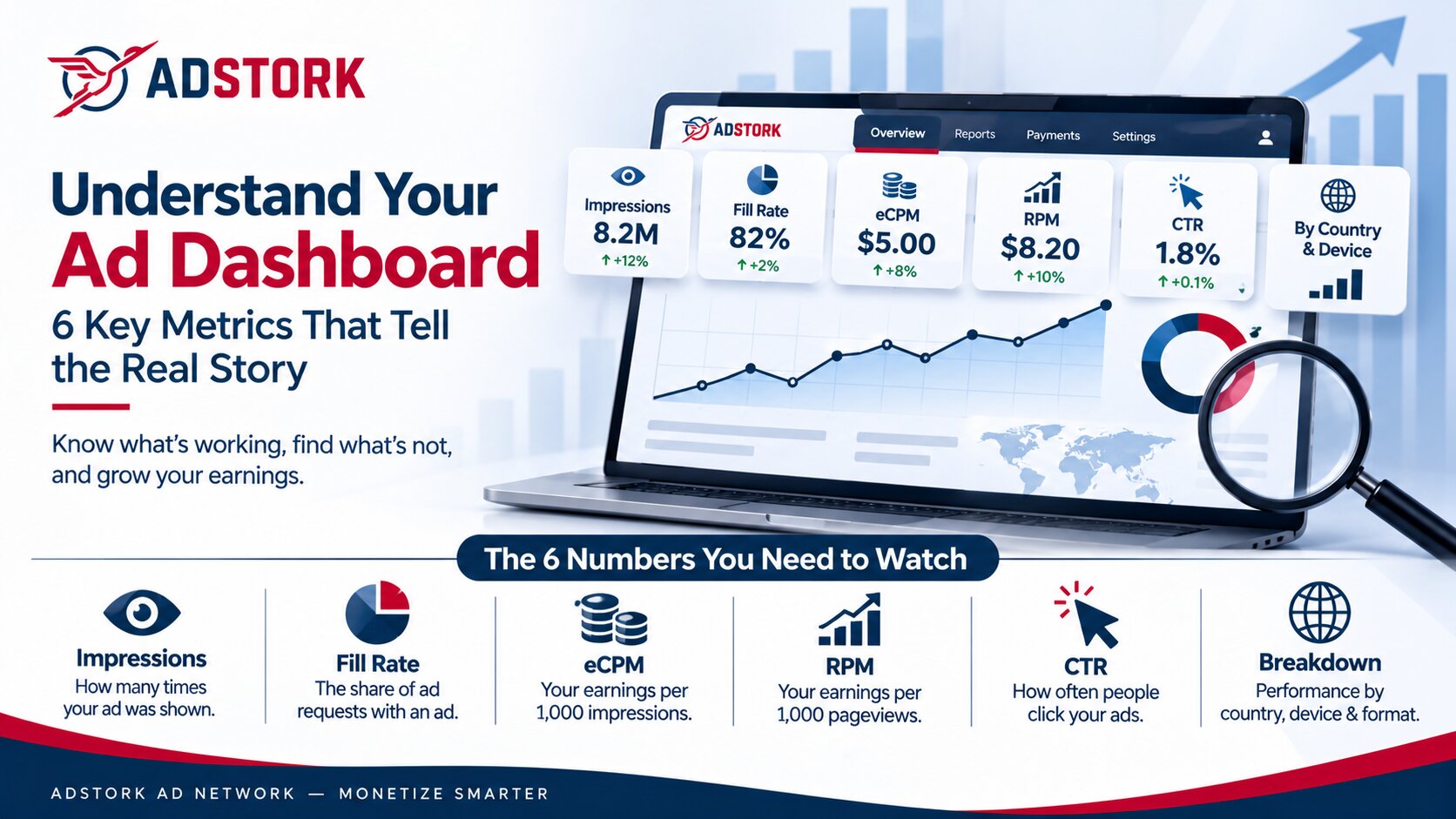
In short: An ad network dashboard shows how your inventory is selling. The six numbers that matter most are impressions, fill rate, eCPM, RPM, click-through rate, and your breakdown by country, device, and format. Read together, they show not just how much you earned, but why.
Key Takeaways
- Total earnings tell you what happened. The other numbers tell you why.
- eCPM and RPM look similar but measure different things, so never compare one to the other.
- One number rarely means anything alone. Look for pairs that move together.
- A five-minute weekly check catches most problems before they become expensive.
What Are the Six Numbers Worth Watching?
Impressions
What it is: How many times an ad was actually shown.
What it tells you: How much inventory you are really selling, which is different from how many visitors you have.
Watch for: Impressions falling while traffic stays steady. That often points to ads failing to load or being blocked.
Fill Rate
What it is: The share of ad requests that came back with an ad.
What it tells you: Whether enough buyers want what you are offering.
Watch for: A sudden drop, or a gap that shows up in only one country or device.
eCPM
What it is: Your earnings per 1,000 impressions.
What it tells you: How well each individual impression sells.
Watch for: A high eCPM paired with a low fill rate. It can mean only the easiest impressions are selling.
RPM
What it is: Your earnings per 1,000 pageviews.
What it tells you: What each page visit is worth, including the effect of how many ads you show per page.
Watch for: RPM rising only because you added more ads. Check that reader experience has not suffered.
Click-Through Rate (CTR)
What it is: Clicks divided by impressions.
What it tells you: How readers are responding to the ads they see.
Watch for: An unusually high CTR. It can signal accidental or invalid clicks, which networks may remove from earnings.
The Breakdown
What it is: Every number above, split by country, device, and ad format.
What it tells you: Where your earnings really come from.
Watch for: One segment dragging down an average that otherwise looks fine.
What Does One Day of Numbers Look Like?
Numbers make more sense with an example. Here is one illustrative day for a small site. These figures are made up to show the math, not benchmarks.
Notice that eCPM and RPM come from the same $41 but answer different questions. eCPM judges each impression. RPM judges each page. A site can lift RPM by showing more ads per page while eCPM stays flat, which is why the two should never be compared to each other.
How Do You Tell a Healthy Dashboard From a Warning Sign?
Looks Healthy
- Fill rate stays steady from week to week
- eCPM moves gently, not in jumps
- Impressions rise and fall with traffic
- CTR is modest and stable
- No single country or device is collapsing
Worth Investigating
- Fill rate drops suddenly
- eCPM falls with no seasonal reason
- Impressions fall while traffic holds steady
- CTR spikes with no change on the site
- One segment falls while the others hold
Where Does Adstork Fit In?
A dashboard is only useful if it shows enough detail to explain a change. Adstork reports in real time and splits results by country, device, format, and placement, so the weak segment is visible instead of buried inside an average.
Publishers also have access to a dedicated account manager, which means a confusing number can be walked through with a person instead of guessed at.
What Is a Simple Five-Minute Weekly Routine?
Compare this week with last week.
Put impressions, fill rate, and eCPM side by side. Ignore single days, which bounce around.
Open the breakdown.
Check country, device, and format for any segment that moved differently from the rest.
Find the one outlier.
Pick the single number that changed the most. Investigate that before touching anything else.
Write one line down.
Note what you saw and what you changed, if anything. After a few months, those notes become your own benchmark, which is more useful than any industry average.
What Are the Honest Limits of a Dashboard?
Reality check: A dashboard reports what happened, not why. Small sites see big swings from small numbers, so one odd day proves little. Seasonal patterns can move eCPM without anything being wrong, and different networks define some metrics slightly differently, so compare like with like.
Treat every number as a clue, then confirm the cause with a test before changing your setup.
What Comes Next for Publisher Reporting?
More dashboards now flag unusual changes automatically and suggest fixes. That helps, but suggestions are only as good as the person judging them. Publishers who understand these six numbers can question an automated recommendation instead of simply accepting it. As privacy changes push buyers toward contextual and first-party signals, breakdowns by content type and audience will matter more too.
Final Word
You do not need to master every chart. Six numbers, checked for five minutes a week, will tell you more than a daily glance at total earnings ever could. At Adstork Ad Network, real-time reporting by country, device, format, and placement gives publishers the detail to see what is happening and a team to help explain it.
Ready to understand exactly where your earnings come from? Partner with Adstork Ad Network today.
FAQs
What is the difference between eCPM and RPM? eCPM is earnings per 1,000 ad impressions. RPM is earnings per 1,000 pageviews. They use the same earnings but different denominators, so they measure impression quality and page value respectively.
What is fill rate in advertising? Fill rate is the percentage of ad requests that return an ad. If 10,000 requests produce 8,200 ads, the fill rate is 82%.
What is a good fill rate? There is no single number, because fill rate varies by country, device, and format. Compare your fill rate against your own history and look for sudden changes.
Why are my impressions lower than my pageviews? Not every pageview triggers a filled ad. Unfilled requests, ad blockers, and slow-loading ads all reduce impressions compared with pageviews.
How often should a publisher check their ad dashboard? A short weekly review is enough for most sites. Checking daily mostly adds noise, since single days vary a lot.
What reporting does Adstork provide? Real-time reporting segmented by country, device, format, and placement, plus access to a dedicated account manager for help interpreting results.
Leave a Comment